
If your Silent Brick System consists of a Controller and Silent Brick Max, you must first perform the following actions:
-
➤ Establish a SAS connection between Silent Brick Controller Pro and Silent Brick Max.
-
➤ Use the SAS connectors (17) for this.
When connecting multiple Silent Brick Max units, the SAS Switch 16+1 may need to be used. Also connect this to the SAS connectors (17) and then to the Silent Brick Max media.
-
➤ Connect the device to the management network (optional).
-
➤ Use the Management connector (20) for this.
-
-
➤ Connect the IPMI port to the management network.
-
➤ Use the IPMI connector (27) for this.
-
-
➤ Connect the device to the data/management network.
-
➤ Use the data connections (21) for this purpose.
-
-
➤ Connect the device to the power supply.
-
➤ Use the connections on the power supplies (16) for this purpose. If possible, connect each power supply to a separate circuit.
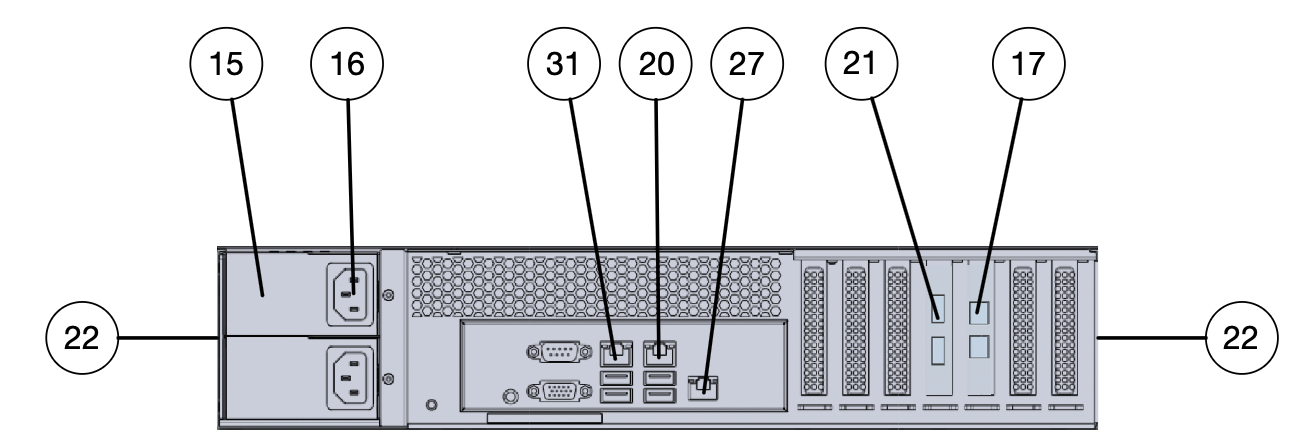
A detailed description of all connectors can be found in the description of theSilent Brick Pro Controller.