
The device may only be opened by qualified personnel.
The device must be connected to a socket with Earth contact.
Ensure easy access to the sockets.
Caution, Risk of Electric Shock: To isolate the power supply, all power sources must be disconnected to prevent the risk of electric shock.

Caution, Risk of Electric Shock

The Drive Plus is the larger version of the entry-level or satellite system. It includes a control unit for the Silent Brick Library, two slots (13) for Silent Brick Storage Containers, and two power supplies (16) for energy provision, and it is not expandable via Shelf.
On the front of the device, three light-emitting diodes (10) are positioned to the left of the display. These indicate the device status as follows:
-
Green: The system is active.
-
Yellow: The system is in standby mode.
-
Red: The system has detected an error (This LED illuminates in addition to the operating status).
In the center of the drive, there is an ePaper Display (11). This contains the following information about the Silent Brick Library:
-
IPv4 address,
-
IPv6 address or IPv4 address of the data network in case of network segregation,
-
Name,
-
Version,
-
Storage capacity,
-
Status,
At the lower corners of the device's front side are the locking levers (14). These levers allow the anchoring between the device and the rack rails to be released.

Fig.: Drive Plus Front
|
No. |
Designation |
|
10 |
Operating Status Indicator |
|
11 |
ePaper Display |
|
13 |
Slots for Silent Bricks |
|
14 |
Locking lever |
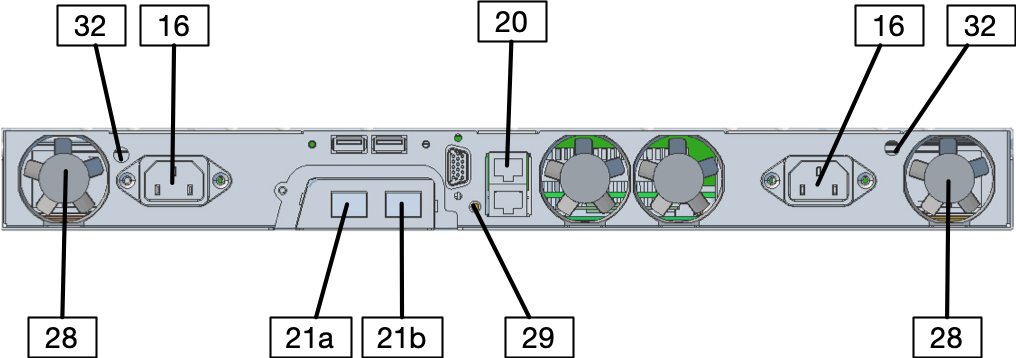
Fig.: Drive Plus Rear
|
No. |
Designation |
|
16 |
Power supply |
|
20 |
Management Port Mgmt1
|
|
21a |
Data Port Data1
|
|
21b |
Data Port Data2
|
|
28 |
Fan |
|
29 |
Power |
|
32 |
Emergency Release for Slots for Silent Bricks |