
Adjust SMB Settings
In the "SMB" section, you can configure the global Samba settings. These include the management of local Samba users as well as integration with Active Directory.
Local SMB Users
Create User
-
➤ In the "SMB" section under "Users", click the "Add" button.
-
➤ Complete all information accordingly in the subsequent window.
-
➤ Save the new user by clicking the "Save" button.
Edit User
-
➤ In the "SMB" section under "Users", select the corresponding user.
-
➤ Open the edit dialog by double-clicking the user.
Delete User
-
➤ In the "SMB" section under "Users", select the corresponding user.
-
➤ Delete the user by clicking the "Remove" button.
Integration with Active Directory
To use users and groups from Active Directory, connect the Silent Brick system to Active Directory as follows:
-
➤ In the "SMB" section under "Active Directory," click the "Edit" button.
-
➤ Complete the edit dialog as follows:
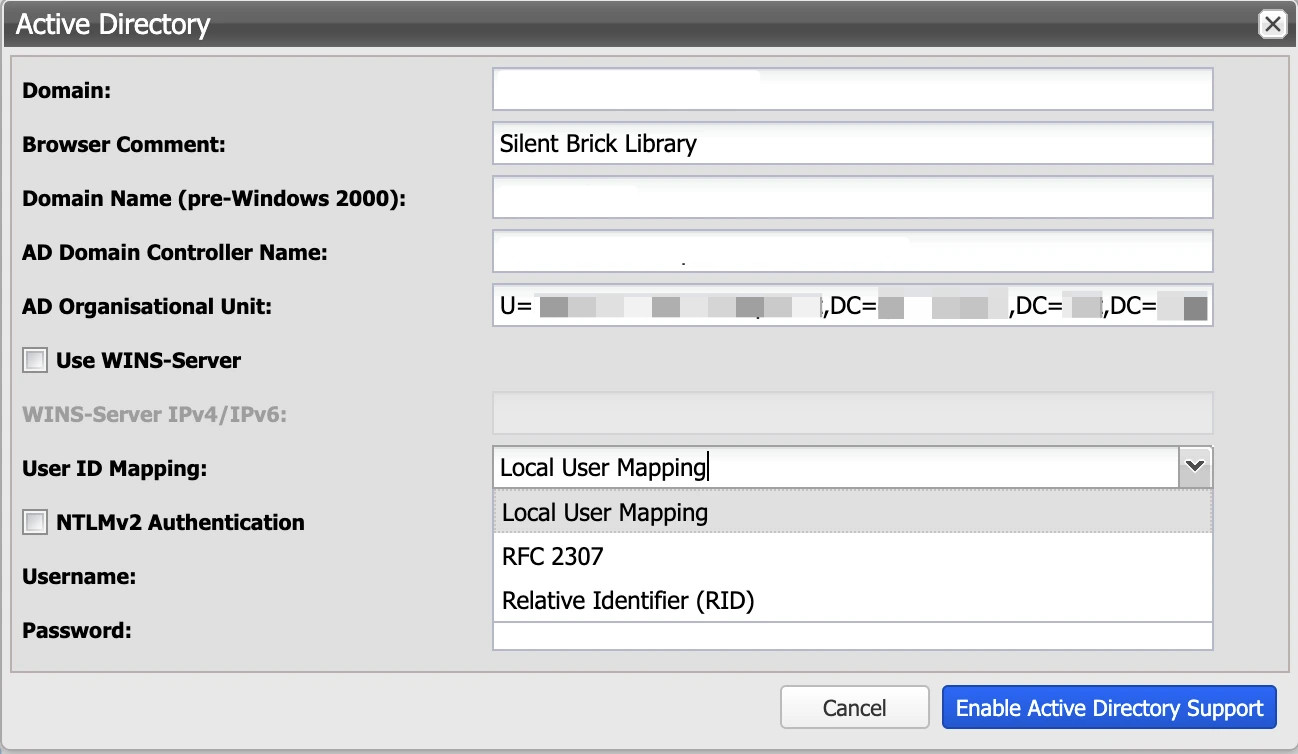
|
Value |
Description |
|---|---|
|
Domain |
Enter the full domain name (e.g., 'fast-lta.intern'). |
|
Browser Comment |
This is an optional value and will be displayed as a comment in Explorer, if desired. |
|
Domain Name (pre-Windows 2000) |
The short name of the domain (e.g., 'fast-lta'). |
|
AD Domain Controller Name |
The full DNS name of the primary domain controller (e.g., 'dc01.fast-lta.intern'). |
|
AD Organizational Unit |
Target OU for adding the computer account |
|
Use WINS Server |
If a WINS server is in use, it can be specified here. |
|
Use RFC 2307 User Mapping on the Local System |
Utilizing RFC 2307 user mapping in Samba enables centralized management of Unix user and group IDs within Active Directory, ensuring that all Samba servers utilize consistent user identifiers and thereby reducing administrative overhead.
|
|
NTLMv2 Authentication |
Particularly in newer Windows Server versions and secure environments, enabling NTLMv2 authentication may be necessary. |
|
Username |
Enter the username of a domain administrator. This is required to join the machine to the domain. User credentials are not stored! |
|
Password |
Enter the corresponding password. User credentials are not stored! |
-
➤ Click the "Enable Active Directory Support" button.
Leave Active Directory
To remove the Active Directory configuration, proceed as follows:
-
➤ In the "SMB" section under "Active Directory," click the "Edit" button.
-
➤ In the following dialog, enter the username and password of a domain administrator.
-
➤ Click the "Disable Active Directory Support" button.